
From Hardcoded Requests to a Configurable Workflow Platform
How we redesigned a Fortune 500 enterprise's monolithic change-request platform into a configurable, event-driven workflow engine. Explore the architecture, asynchronous execution, failure recovery, governance, scalability improvements and AI-assisted workflow generation.
November 9, 2026
·
43 min read
·
Saksham Garg — Owner
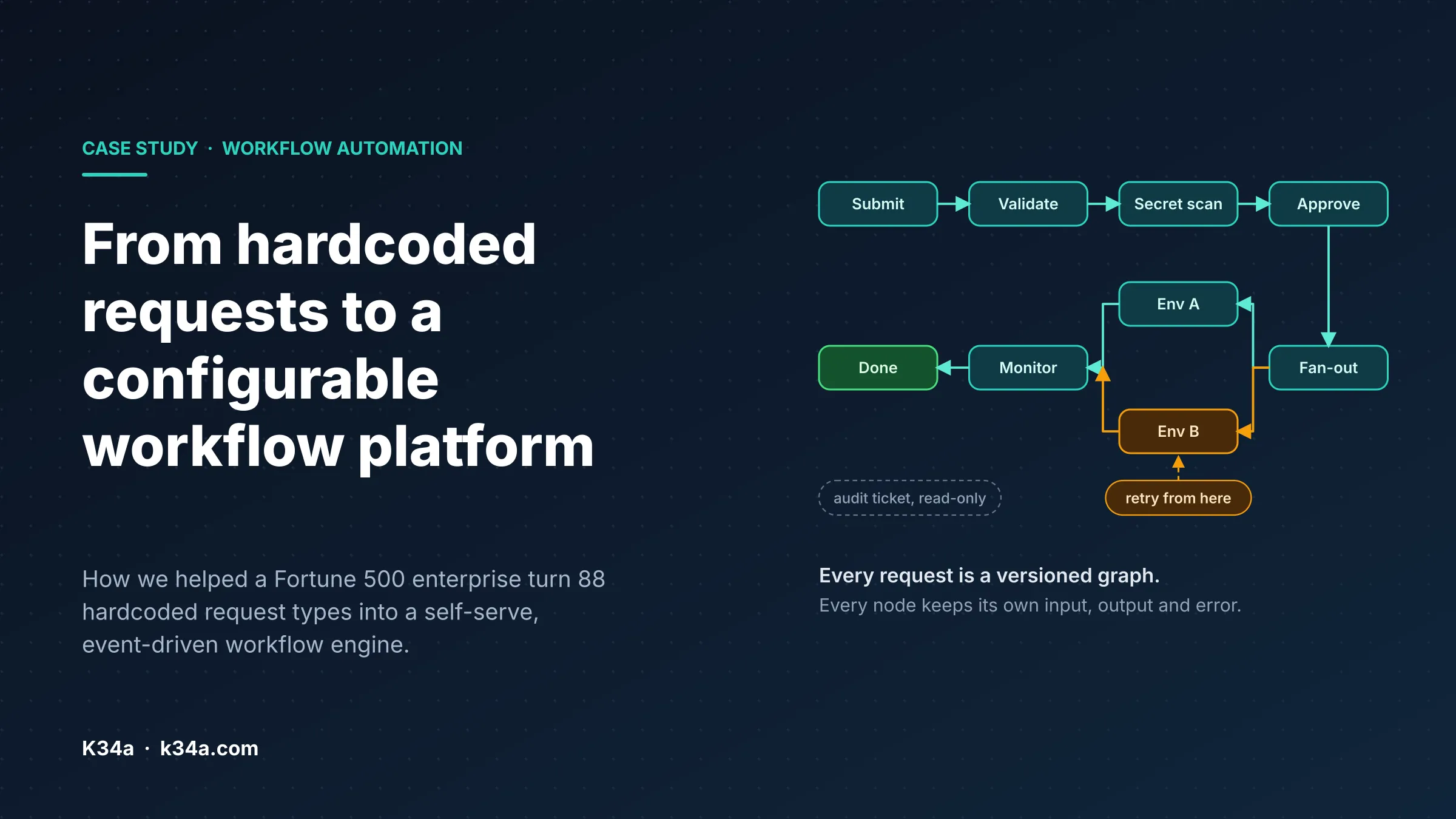
For an enterprise serving at least half of the Fortune 500, production changes are rarely as simple as clicking a button.
If an employee has to perform a database update, or a deployment, or onboard a new customer, or perform any infra change - that can involve multiple teams, approval chains, strict audit requirements and automated execution. Hundreds of such automation workflows exist in large companies for handling different use cases.
For the past couple of months, we have been working with a B2B SaaS enterprise to tackle exactly this kind of complexity. I'm very sure that this internal complexity has been bugging the operation teams of many other companies out there, so here I am documenting whatever we learned while solving this problem.
Before we go deep dive, let's first understand the context and some basic background.
Our client is a B2B SaaS enterprise. It has an internal automation ecosystem that has evolved over the past 15 years, and maintained primarily by the DevOps team, it serves practically every function in the organisation: Engineering, QA, Support, Release Management, and more.
It is a collection of more than 75+ modules, each supporting a different operational use case. For example:
-
Database Operations: Employees can query customer data (obviously with masking, tokenization) or meta data by running read-only queries in this module. It supports different data systems like MongoDB, Redis, MySQL, ElasticSearch, Cassandra, etc.
-
API Browser: Search and execute some pre-defined functionalities (like macros) by simply filling out a form. Similar to having a huge collection of APIs in Postman, but integrated in the ecosystem.
-
Alert Management: Manage and configure automated alerts from Prometheus, ElasticSearch, Graylog, Influx, Sensu - by simply setting conditions, thresholds, recipients, runbooks, and ownership.
-
Infrastructure Management: Monitor and manage resources through dedicated dashboards. The MongoDB module, for instance, provides instance health and resource metrics, alongside operations such as scaling, restarting nodes, and migrations.
-
...and many more
K34a was initially engaged to modernise this ecosystem, which was previously running on OpenJDK 8 (Java 8), by upgrading it to newer compatible versions. We will cover that engineering effort in a separate case study (coming soon!)
But while working with the platform team, we came across one module that deserved attention of its own: Request Service.
Request Service: The problem we set out to solve
Request Service was the gateway through which production changes were requested, approved, and executed.
An employee could request anything from a simple database update to a complex operation involving multiple environments. The platform handled the request lifecycle, collected the necessary approvals, triggered the underlying automation, and maintained an audit trail through Jira.
What made this module particularly interesting was the number of different workflows it supported. And more importantly, how those workflows were implemented.
How requests worked before
To understand what we changed, let's first look at the architecture we inherited.
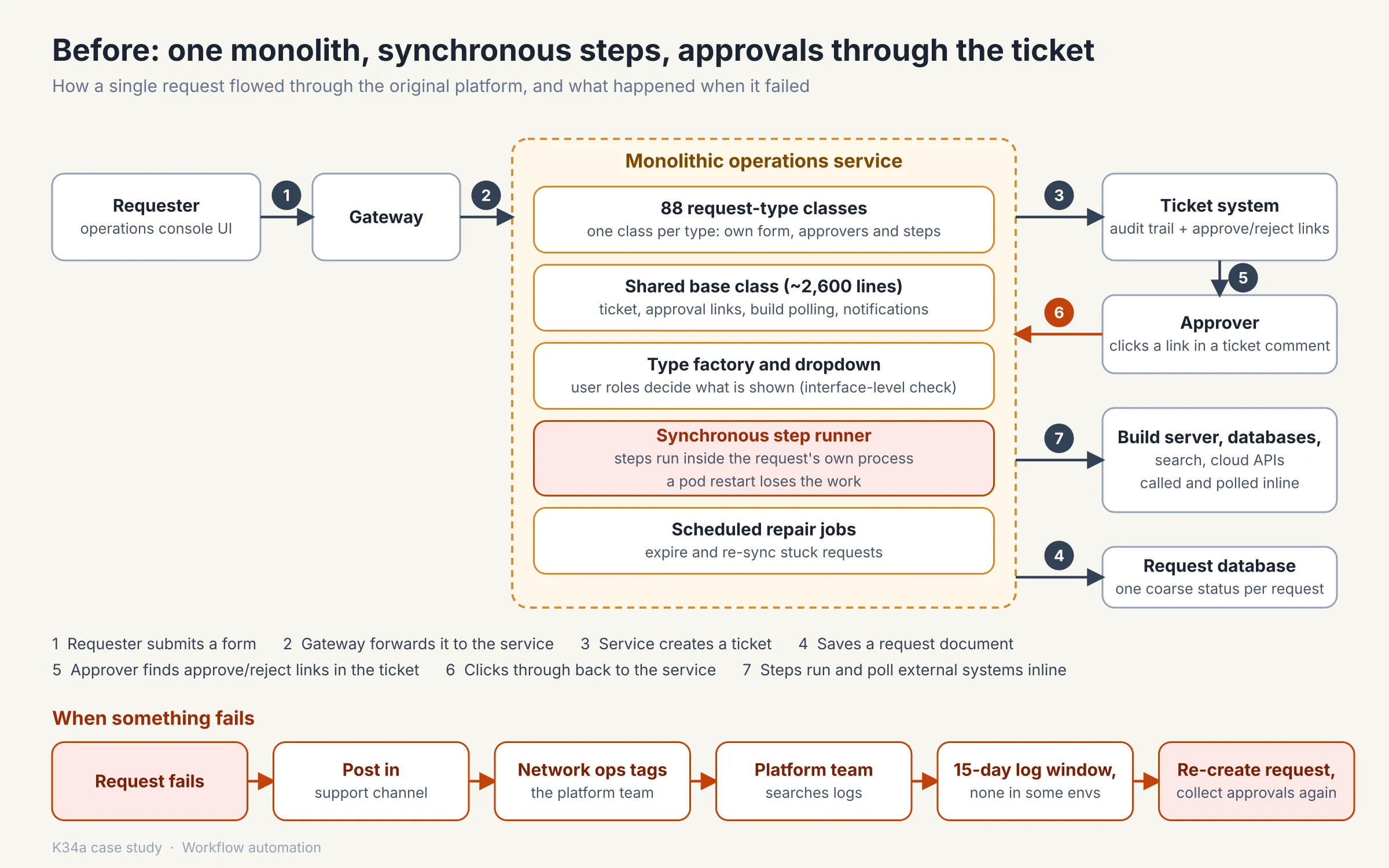
The original implementation was a monolith. Every request type was implemented as a separate Java class, and by the time we started working on it, there were approximately 88 such classes. In other words, the tool supported 88 different types of workflows which employees could trigger.
Each class was responsible for defining:
- The form presented to the user, i.e. inputs required by the workflow
- Input fields and validation rules.
- Approval levels and approval conditions - who will approve this flow?
- Which roles could see and trigger the request (visibility rules)
- The operations to execute after approval
- Any additional behaviour specific to that request type (yes, as you can imagine - this led to many hardcoded rules).
All these classes inherited from a common base class of approximately 2,600 lines.
This base class was doing a lot more than a base class probably should. It handled Jira ticket creation, approval comments, build-job polling, email and teams notifications, request status transitions, and several other responsibilities associated with the request lifecycle.
A factory pattern discovered the available request classes during application startup and used them to populate the available request types that users interacted with.
In other words, the application was essentially a collection of hardcoded workflows sharing a common execution and lifecycle implementation. Any new wokflow, or a change in the existing workflows would require code changes and re-deployments across all 25 environments.
The request lifecycle
The lifecycle of a request was fairly straightforward:
- Request creation: An employee opened the application, selected a request type, filled out the form, and submitted it.
- Persistence and tracking: The application created a Jira ticket and stored a request document in MongoDB with its current status.
- Approval: The designated approver received the Jira ticket. Approval and rejection links were embedded in the ticket comments, taking the approver back to the application.
- Execution: Once approved, the application executed the request's operations. In most cases, these operations ran within the same application process that had received the approval.
- External job monitoring: For operations involving external systems, such as Jenkins builds, the application ran a cron job to poll those systems until the jobs completed.
- Recovery: Scheduled repair jobs periodically attempted to identify and recover requests that had expired or become stuck.
For a system of this size, this was a relatively simple architecture.
And to be fair, it had some genuine advantages.
Everything related to a request type lived in one class. Developers could navigate the code, understand the execution flow, and debug it using familiar Java debugging tools. There was very little additional infrastructure to maintain: essentially one application and one database.
If we were building a platform with five or ten relatively stable request types and knew that the number won't increase,, we might have made the same architectural choice.
The problem was that this platform had grown far beyond that point.
The problems we discovered
As we explored the implementation and spoke with the people maintaining and using it, we started noticing recurring problems.
Some were architectural. Others were operational. A few were security concerns that we felt deserved immediate attention.
We eventually grouped them into six major areas.
1. Adding a new request type was slow and centralised
Every new request type required a developer to write another Java class.
The requesting team might know exactly what the workflow needed to accomplish, which inputs it required, and which approvals it needed. But translating that knowledge into an executable workflow was entirely the responsibility of the platform team.
The process typically involved:
- Raising a request with the platform team.
- Explaining the required functionality and business logic.
- Getting the implementation prioritised.
- Developing and reviewing the request (a lot of back-and-forth discussions).
- Getting the changes merged and deployed across all enviroments.
Even a relatively small change could involve several people and multiple rounds of coordination.
There was another problem: the same application was deployed across 25 environments. A change to one request type meant releasing the entire application, even when the rest of the platform had nothing to do with that change. Right from merging to deploying changes, a release took at least 30 minutes of developer time.
The platform team had effectively become the bottleneck between an organisation's operational requirements and its ability to automate them.
2. Execution was synchronous and fragile
This was probably the most significant architectural limitation.
Once a request received approval, its execution happened inside the application process. If a workflow involved several operations, the application would execute them sequentially, waiting for each operation to finish before proceeding.
Consider a request that triggers a Jenkins build and waits for its completion.
The application would initiate the build, periodically poll Jenkins, and wait until it received a final status.
What happens if the application pod restarts during that wait?
The request might still exist in the database, but the application had no reliable record of exactly which execution step had completed, which one was running, and which ones were yet to begin.
The system persisted the overall request status, but it did not maintain a sufficiently granular execution history.
Recovery therefore became complicated. The platform had to infer what had happened rather than simply resume from a known point.
This also meant that long-running operations and human approvals could consume application resources for much longer than necessary.
3. Sometimes no-one ever knew why a request failed
We found that debugging a failed request was almost a workflow of its own.
A typical failure would trigger something like this:
- The requester reported the failure in a support channel.
- The Network Operations team picked up the issue.
- They tagged the platform team.
- The platform team investigated application logs.
- If the issue appeared to originate in a database, Elasticsearch, or another external dependency, the corresponding team was brought into the discussion.
And this was not always a quick process.
Application logs were retained for only 15 days. Some production environments did not even have graylog or log-search capabilities available.
There was also no mechanism to retry execution from the failed operation. If a request failed halfway through, the requester generally had to submit it again and collect all the approvals from scratch.
This was particularly painful for workflows involving several operations or multiple environments.
We felt that a system responsible for executing production changes should be able to answer three basic questions without requiring an engineer to reconstruct events from scattered logs:
- What exactly was executed?
- Where did it fail, and why?
- What can safely be retried?
The existing implementation could not reliably answer all three.
4. Approvals and request status lived in different places
Jira was used for tracking and approvals, while the actual request lifecycle was maintained in the application.
This created an unnecessary back-and-forth.
An approver would receive a Jira ticket, scroll to the last comment in that ticket, follow an approval link in that comment to return back to the application and provide approval.
The requester, meanwhile, had to navigate between Jira and the application to understand what was happening. For example - if a request triggered a jenkins build, then the build link would be posted in the Jira ticket as a comment (which is great for audit by the way), but that was never visible in the application.
Both systems contained parts of the same operational story, but neither provided a complete, convenient view of it.
5. A single operation could involve three different modules
One particularly interesting example was sensitive cURLs - basically cURLs performing sensitive operations.
The client had separate modules for managing these cURLs, requesting approval to execute them, and actually triggering them after approval.
So a seemingly simple operation could involve three different journeys:
- Create or edit the sensitive cURLs definition in one module.
- Raise a request and obtain approval through Request Service.
- Navigate to another module to manually trigger the approved cURL.
We felt this was an unnecessary separation of responsibilities.
The definition, approval, execution, and audit trail were all parts of the same operational workflow. There was no compelling reason for users to experience them as unrelated operations. When we talked with the platform team, even they didn't knew how this all was organized :)
6. Authorisation relied too heavily on the interface
This was a more serious concern.
The application filtered available request types based on a user's roles. If a user was not authorised to access a particular request type, the UI would simply hide it.
However, the server did not consistently revalidate the user's permissions when a request was triggered or executed.
Similarly, certain client identifiers were validated only in the browser.
In any application that can modify production infrastructure, customer records, and sensitive services, security is a serious concern. UI-level restrictions are never sufficient for security of an application. The backend always needs to be the decision making final authority on whether a user could view, trigger, or execute an operation. That was missing.
We wanted authorisation to be enforced independently of how a user interacted with the UI.
The scale ceiling
There was one more problem, and arguably the one that made the architectural limitations impossible to ignore.
Request Service was not running as an isolated application. It shared its underlying service with the ecosystem's other modules.
Based on our observations and the capacity available in the existing deployment, the overall service was topping out at approximately 200 requests per second across all 25 environments.
This was not simply a matter of increasing the number of application pods.
The synchronous execution model meant that application threads remained occupied while waiting for external systems, build jobs, database operations, and other long-running tasks.
As concurrent traffic increased, more threads remained blocked, leaving fewer resources available to accept and process incoming work.
We had already seen this fail during an AWS outage. The client was migrating everything in an environment to a completely different region due to an AWS outage, and during that migration, an engineer generated approximately 1,500 requests in a single minute against that one production environment. Well, you can guess - every one of those requests were stuck (all in 'waiting' status forever) and the entire ecosystem got hanged for everyone. The only option available with the platform team was to restart the pods :)
It wasn't necessarily that any individual request was invalid or particularly expensive. The platform simply could not absorb the sudden burst. Rate limiting should have been setup as a first line of defence, which was not.
This was the point where we started thinking beyond individual bug fixes.
We could optimise database queries, increase thread pools, add more pods, or improve the existing implementation. But those changes would only address symptoms.
The fundamental problem was that the application was responsible for accepting requests, managing their lifecycle, executing operations, and waiting for external systems, all within the same execution model.
We needed to separate these responsibilities.
Thinking of a better solution
We initially worked the team to work on upgrading the application technology - by moving to newer versions of those languages, libraries and frameworks. We could have limited ourselves to that scope, and moved on.
But since the upgrade compelled us to deeply study the Request Service module, we simply couldn't stop ourselves from not looking into the problems with it. Yes - the library and package upgrades would stabilize a lot of issues, but the bigger issue was the architecture underneath it.
We took our observations to the client and explained why we believed the existing design would become increasingly expensive to maintain as the number of workflows, environments, and concurrent requests have been growing.
Rather than presenting a list of technical complaints, we approached the discussion from three perspectives:
- Developer productivity: Why should introducing a new operational workflow require a code change and a platform-wide deployment?
- Operational reliability: Why should a failure halfway through a workflow require the entire request to be submitted and approved again?
- Scalability: Why should waiting for an external operation consume the same application resources needed to accept new requests?
We then proposed a different architecture.
We had an interesting observation. Out of those 88 workflows, atleast 50 of them triggered a jenkins job as a step. When we dug further, we realized that all these workflows are essentially sequences - which are stitching the same type of operations into different permutations. On taking 15 unique categories (like mongo update, mongo delete, trigger jenkins job, poll jenkins job, input validation, storing to cloud storage [s3/gcs/azure blob], approval, etc.), we could simply model 97% of workflows.
That's it. We had got it.
The central idea was to move workflow definitions out of application code and into versioned configuration, execute individual operations asynchronously through an event-driven system, and persist the execution state of every step.
We also wanted approvals, authorisation, auditability, and failure recovery to become first-class capabilities of the platform rather than responsibilities scattered across individual request classes.
The client agreed with the direction, and we started working on the redesign.
One decision we made early was particularly important: we would not replace the entire system in one go.
The old platform was used by practically every operational team in the organisation. Replacing it wholesale would have introduced unnecessary migration risk.
Instead, we proposed running the new platform alongside the existing one, migrating workflows incrementally, and validating the new execution model against real use cases before moving the entire catalogue.
This gave us room to learn, iterate, and correct architectural decisions without disrupting the workflows that teams depended on every day.
Why didn't we use an existing workflow orchestration framework?
Before designing our own workflow engine, there was an obvious question: why build something from scratch when several mature, open-source workflow orchestration frameworks already exist?
It is a fair question. We considered this category of tools, and there are some excellent projects worth mentioning.
A few examples:
- Apache Airflow: Probably the first thing that crossed our minds, and could easily have handled most of our required orchestration capabilities. It is widely used for data pipelines, scheduled jobs, and dependency-driven tasks. It provides DAG-based execution, retries, scheduling, and a rich ecosystem of operators.
- Temporal: A durable execution platform designed for long-running workflows. It provides workflow state persistence, retries, timers, and recovery from failures.
- Argo Workflows: A Kubernetes-native workflow engine that supports DAG-based orchestration, parallel execution, retries, and container-based tasks.
- Netflix Conductor: A microservices orchestration engine that allows workflows to be defined declaratively, with support for asynchronous tasks and human-in-the-loop workflows.
- Camunda: A workflow and process orchestration platform particularly suited to business processes involving human tasks, approvals, and automated execution.
We certainly did not want to reinvent capabilities that these projects had already solved.
However, there were two important considerations in our case.
1. Database compatibility was a hard constraint
MongoDB was already an approved database by security for storing workflow metadata. By choosing an orchestration framework that didn't support MongoDB we would re-require security team's review, assessment and approval of the architecture which would have taken several months. Not only that - since the platform team already used MongoDB heavily in the application, choosing a different database would be a significant operational overhead.
This immediately ruled out some straightforward adoption paths.
Take Apache Airflow, for example. Its metadata database is built around SQLAlchemy, and its officially supported production database backends include PostgreSQL and MySQL. SQLite is intended for development rather than production. MongoDB is not an officially supported metadata backend.
Temporal also has its own persistence requirements, with supported persistence backends including SQL databases and Cassandra. It does not provide MongoDB as a standard persistence backend either.
Other frameworks have different approaches. Argo Workflows, for instance, models workflows as Kubernetes resources, while Netflix Conductor supports several persistence implementations, including Redis, Cassandra, MySQL, and PostgreSQL.
This doesn't mean these frameworks are inherently unsuitable for enterprise use. It means adopting them would have required us to work around an existing infrastructure constraint or seek additional security approvals.
We did not want the workflow engine to introduce another database dependency simply because its default architecture expected one.
2. We needed an automation ecosystem, not just a workflow engine
This was arguably the more important consideration.
Our client's existing ecosystem had evolved over approximately 15 years. It was not simply a collection of tasks connected by dependencies.
It had accumulated a large number of domain-specific capabilities:
- Different forms and dynamic input fields for different operational requirements.
- Environment-specific and role-based visibility.
- Multi-level approval policies.
- Integration with Jira, Jenkins, internal APIs, databases, monitoring systems, and cloud infrastructure.
- Custom execution macros for different infrastructure components.
- Sensitive cURLs management and execution.
- Cross-environment operations.
- Centralised audit trails and operational reporting.
We needed to preserve these capabilities while making the underlying workflow definitions configurable.
An orchestration engine could solve the problem of executing a DAG, but it would not automatically provide the complete user-facing experience, governance model, integrations, authorisation rules, and operational conventions that the client's application had accumulated.
We could have taken an existing framework and built all these capabilities around it. In fact, that would have been a reasonable architecture if the framework had aligned with the infrastructure requirements.
But doing so would still have involved substantial custom development, adapters, integration layers, and potentially a different persistence model.
We therefore decided to build a purpose-specific workflow platform.
This was not a decision to write every component ourselves. We still wanted to reuse established infrastructure and libraries wherever possible.
The distinction was that we would own the workflow definition model, execution lifecycle, governance, and integrations rather than trying to force the client's requirements into an existing framework's abstractions.
The trade-off: We gained control over the architecture and could tailor it to the client's existing ecosystem. In exchange, we took responsibility for building and maintaining capabilities such as scheduling, retries, execution recovery, event handling, and workflow versioning. But this trade-off was worth the risk especially since the developer productivity boost we have been observing with the advent of AI agents.
That is a significant engineering commitment. We would not recommend it simply because a team wants a custom workflow builder. In our case, the combination of infrastructure restrictions, existing integrations, and domain-specific requirements justified it.
Re-imagining a request as a graph
Now that we had decided to build our own platform, we needed to settle on a fundamental abstraction.
The old implementation treated every request type as a Java class. We wanted to represent the same thing as configuration.
Our approach was to model every workflow as a versioned Directed Acyclic Graph (DAG).
If you have worked with workflow engines, data pipelines, or build systems, the concept will be familiar.
A graph consists of nodes and edges:
- A node represents an individual operation.
- An edge represents a dependency between two operations.
- A condition on an edge determines whether execution should continue along that path.
Instead of writing an entire workflow in Java, an authorised user would assemble a collection of reusable nodes and connect them to describe the desired behaviour.
The three entities behind the model
We structured the underlying data model around three primary entities.
1. Workflow Definition
This describes what a workflow is supposed to do.
It contains:
- The form definition and input schema.
- The graph structure and node configurations.
- Visibility and authorisation rules.
- Approval requirements.
- Environment and application restrictions.
- Audit and Jira configuration.
- Workflow version and publishing information.
Think of this as the blueprint. This is what the java class used to define in the older version.
2. Request Instance
A request instance represents an actual execution of a workflow definition.
Whenever someone submits a request, we create a new instance referencing the exact workflow version that was used.
This distinction matters. If someone edits and publishes a workflow while an older request is still running, the existing request must continue using the definition it started with.
We never want a running production operation to unexpectedly change its execution logic because someone published a newer version of the workflow.
3. Node Execution Record
Every time a node executes, we maintain a separate execution record.
It captures information such as:
- The node being executed.
- Its configuration.
- Input data (which gives us complete visibilty of what went into the node and how the node behaved).
- Execution status of that node.
- Start and completion timestamps.
- Output data.
- Error details (yes - we now capture complete stack trace of every error or exception).
- Retry information.
This is what makes the execution history granular.
Instead of knowing only that a request failed, we can identify the exact operation that failed, inspect its inputs and outputs, and understand what happened before and after it.
For example
Let's take a slightly more involved example.
Suppose an engineer wants to update a customer record across multiple production environments.
In the old implementation, the entire operation would have been encapsulated inside a dedicated Java request class.
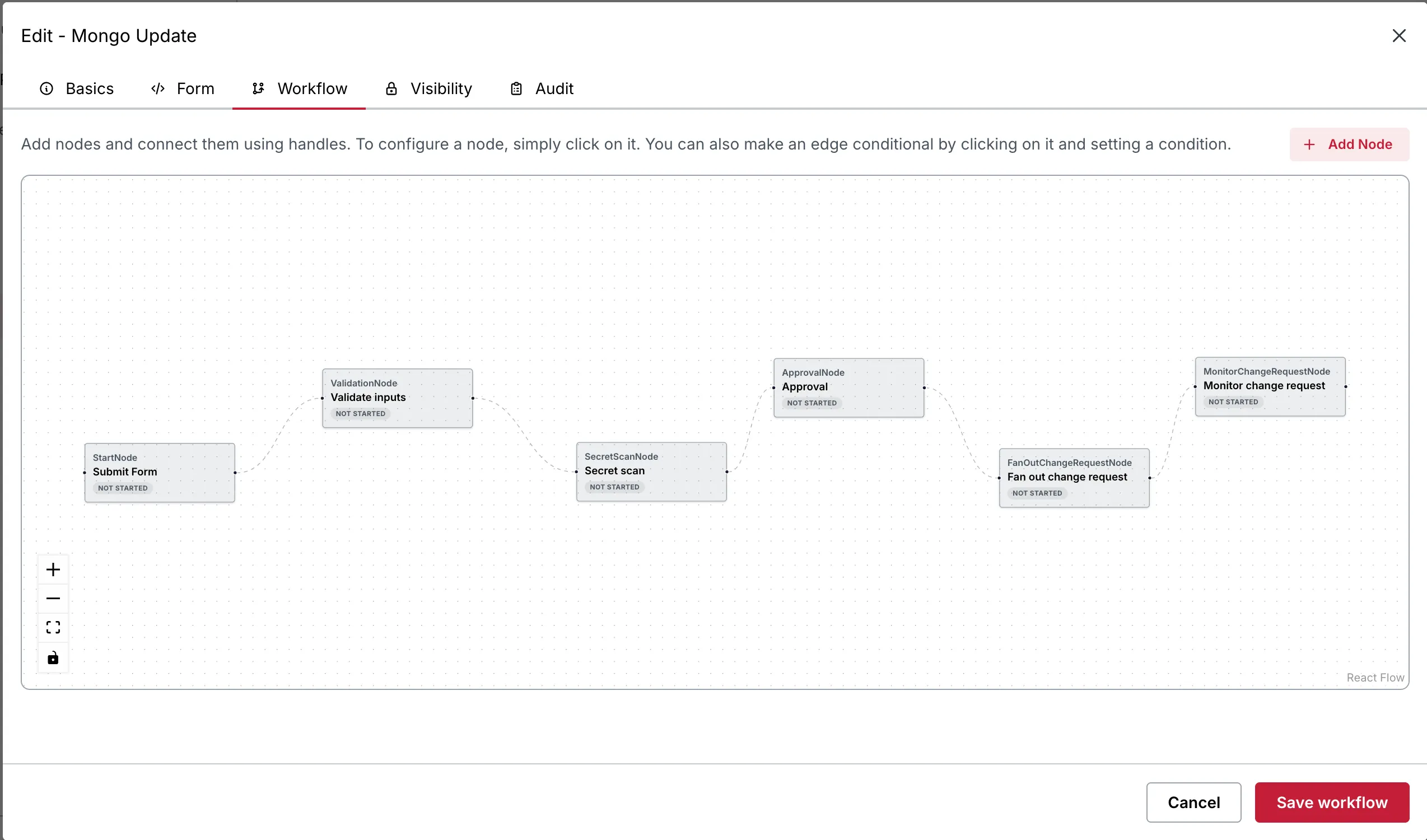
In the new platform, we can represent it as a graph with following nodes in order:
- Validate the submitted inputs.
- Upload the execution payload to cloud storage.
- Scan the payload for sensitive information or secrets.
- Wait for the required approval.
- Fan out the operation across the target environments.
- Monitor the child requests.
- Mark the parent workflow as complete once the required child executions finish.
Each of these operations becomes an independently configurable node.
The same nodes can be reused in completely different workflows. A cloud-storage upload node, for example, does not need to be implemented again just because another team wants to use it before a different operation.
We built a library of node types covering capabilities such as:
- Jenkins build triggers and monitoring.
- Database reads and writes.
- Sensitive API execution.
- Conditional waits.
- Manual advancement and approval gates.
- Cloud-storage uploads.
- Cross-environment execution.
The important distinction here is that users configure workflows using these building blocks. They do not need to write Java code for every new combination of operations.
How does execution move through the graph?
A node becomes eligible for execution when its dependencies have completed and the conditions on the relevant incoming edges are satisfied.
Some nodes execute immediately. Others wait for an approval, an external signal, a scheduled window, or the completion of an external job.
We made these execution modes explicit rather than allowing every request class to implement its own variation of waiting, polling, and continuation.
This gave us a common execution model.
It also made the graph itself useful beyond execution. We could render it in the UI with react flow, show users which operations had completed, identify the currently running node, and highlight exactly where something had failed.
The workflow was no longer hidden inside a Java class, and a failure was no longer hidden inside logs. It became something that could be inspected, understood, reviewed, and reused.
The architecture we built
With the workflow model established, we moved on to separating the responsibilities that had previously been bundled into one application.
The most important architectural decision was to separate workflow orchestration from workflow execution.
The new platform consists of the following major components.
1. React frontend
We built a new React-based interface with separate experiences for:
- Creating and publishing workflows.
- Submitting requests.
- Tracking requests created by the current user.
- Reviewing requests awaiting approval.
- Inspecting execution history.
- Managing existing workflow definitions.
The workflow builder provides a visual canvas where users can add nodes, connect them, and configure their behaviour.
2. Control plane
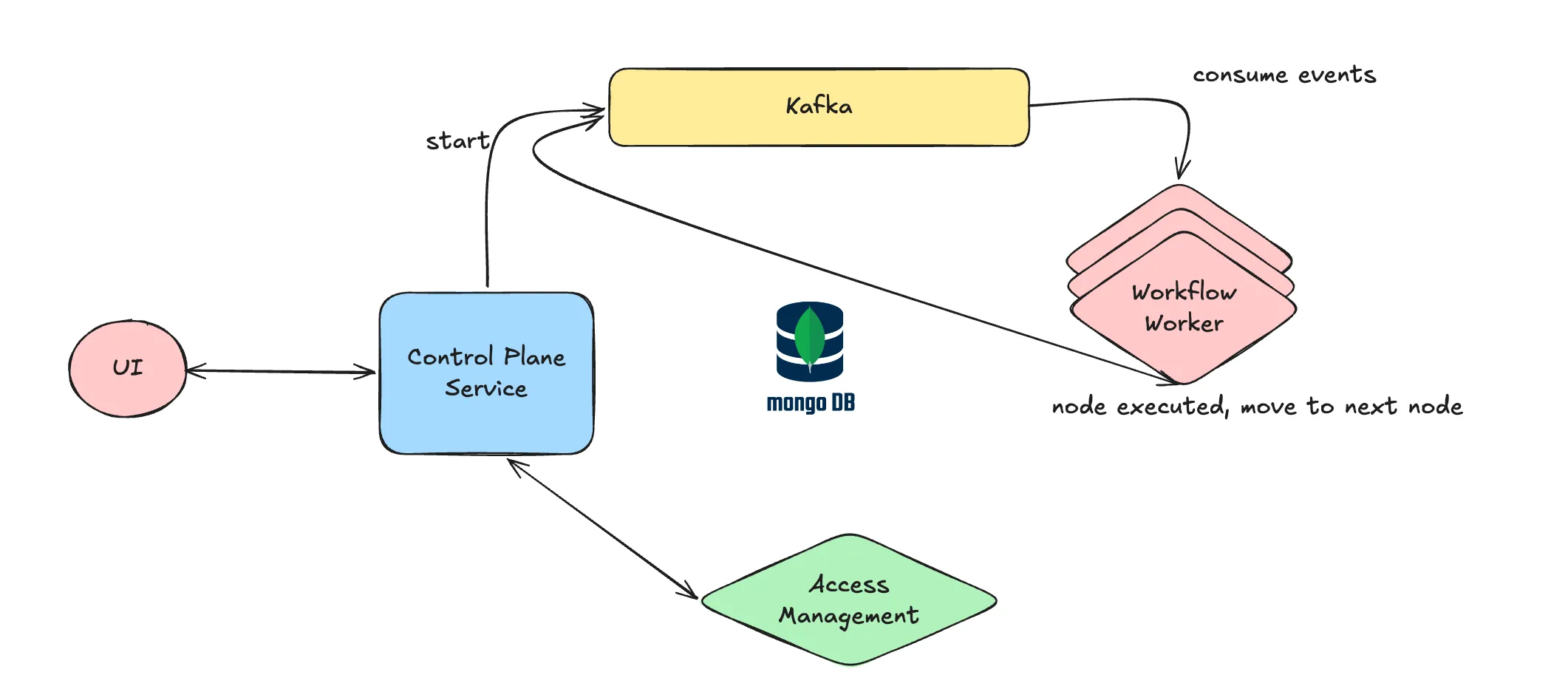
The control plane is the central entry point for user-facing operations.
It is responsible for:
- Discovering which workflows a user can access.
- Validating workflow submissions.
- Creating request instances.
- Persisting workflow execution history.
- Handling approval and rejection actions.
- Handling retries.
- Managing workflow versions.
- Applying rate limits to workflow triggers.
One important design decision was that the control plane does not execute workflow nodes itself.
Its responsibility is to manage the lifecycle of a request and coordinate execution, not to perform the actual operational work.
This keeps user-facing operations relatively lightweight and prevents long-running external operations from consuming resources in the control plane.
3. Access management service
We moved authorisation into a dedicated access management service.
Whenever the control plane needs to determine whether someone can view or trigger a workflow, it consults this service.
The same applies to the relevant approval and execution actions.
This gives us a central place to enforce access policies rather than relying on individual UI components or workflow implementations.
It also makes future integrations easier. A partner-facing application, for example, can use the same underlying access policies without having to reproduce the application's authorisation logic.
4. Workflow workers
The actual execution happens inside independent workflow workers.
Workers consume events from Kafka, identify the corresponding node executor, perform the operation, persist its execution result, and publish subsequent events when the node completes.
Different node types can therefore perform different operations without forcing the control plane to understand their implementation details.
5. Versioned workflow catalog
Workflow definitions are stored in a versioned catalog in MongoDB.
The catalog is responsible for maintaining the definitions available to the platform, including their configuration and publishing information.
We also introduced a controlled distribution mechanism across environments. Only designated environments accept workflow edits, while the other environments periodically synchronise their enabled definitions.
This allows the client to govern changes centrally while keeping the workflow definitions available across its distributed environment estate.
Putting everything together
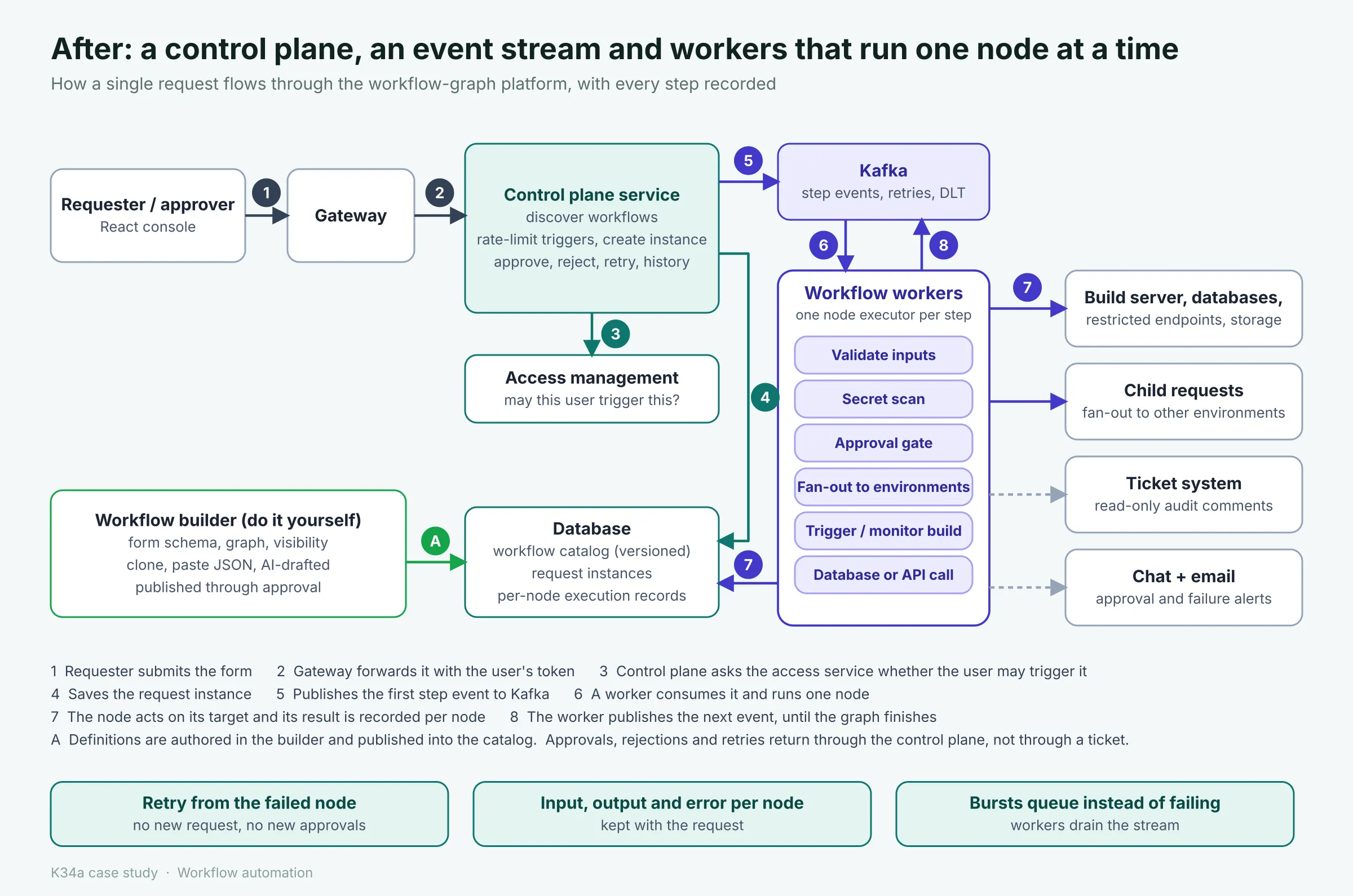
The overall execution flow looks like this:
- A user submits a request through the React interface.
- The control plane validates the request and checks access permissions.
- A request instance is persisted in MongoDB, pinned to the relevant workflow version.
- The control plane publishes an execution event to Kafka.
- A worker consumes the event and executes the corresponding node.
- The worker persists the node's execution record, including its status, output, and any errors.
- Depending on the graph and its conditions, subsequent execution events are published.
- The process continues until the workflow reaches a terminal state.
If an operation fails, the platform can use the recorded execution state and retry mechanisms to recover without requiring the entire request to be recreated.
Approval, rejection, and retry actions also go through the control plane. We no longer depend on special links embedded inside Jira comments to drive the workflow lifecycle.
This separation gave us something the old architecture lacked: a clear boundary between accepting and managing work, executing work, and enforcing access to that work.
What we changed, area by area
The architecture describes how the pieces fit together. But the real value of this project was in how those architectural decisions translated into day-to-day operations.
Let's look at what changed for the people actually using the platform.
1. Creating a workflow no longer requires a code change
This was one of our primary goals.
Previously, adding a request type meant writing a Java class, getting it reviewed, merging the code, and deploying the application.
Now, an authorised user can create a workflow directly through the workflow builder.
We provided three ways to get started:
- Start with a blank workflow.
- Clone an existing workflow and customise it.
- Paste an existing workflow definition as JSON.
The form itself is configuration-driven. We use JSON Schema to describe the fields, validations, dependencies between fields, and other input requirements.
For example, a field might be required only when another field has a particular value. Similarly, certain dropdown options can be populated dynamically by fetching data from backend services.
The graph is constructed visually on a canvas, with each node configured independently.
We also introduced visibility rules to determine which environments, applications, and roles can view and trigger a particular workflow.
But we didn't want configuration-driven to mean unrestricted.
Allowing every team to create workflows that could execute production operations without oversight would simply replace one problem with another.
So we introduced a publishing and governance process.
A workflow modification goes through the required approvals, including the author's manager, owners of the relevant cloud environment, and the security team. A reason for the change is also recorded.
Only designated environments accept workflow edits. Other environments periodically synchronise their enabled definitions, at approximately 30-minute intervals.
Every publication creates a new workflow version. Older versions are archived to object storage, and existing requests continue executing against the version they originally started with.
This gives us two important properties:
- Teams can independently author workflows without requiring a Java deployment for every change.
- Production workflow changes remain governed, versioned, and auditable.
2. Execution is now asynchronous
We moved away from executing an entire request inside the application process.
Every node now has an independent execution lifecycle.
When a node completes, it persists its result and emits an event that allows the next eligible node to execute.
This changes the way the system behaves under both normal and failure conditions.
Consider a workflow waiting for an approval that might take an entire day.
In the old implementation, waiting and polling were responsibilities of the application itself. In the new architecture, the workflow state is persisted, and execution can simply pause until the required action occurs.
The same applies to external operations such as Jenkins builds. A worker can initiate the build, persist the relevant execution information, and allow the workflow to continue when the completion event or monitoring result becomes available.
No application thread needs to remain blocked for the entire duration.
More importantly, a pod restart no longer means losing the in-memory execution context of an entire request. The persisted state and event-driven execution model provide a way to resume processing.
We also gained independent control over the worker layer. The control plane can continue accepting and managing requests without being responsible for performing every operation itself.
3. Failure recovery and debugging became first-class capabilities
This was one of the areas where we wanted to make the biggest practical difference.
Previously, a failed request often meant starting the entire investigation from scratch.
Now, every node maintains its own execution record.
When something fails, the user can inspect:
- The node configuration.
- The input passed to the node.
- The output returned by the operation.
- The execution status.
- The error details.
- Relevant timestamps and external job references.
For example, suppose a workflow triggers a Jenkins build.
If the build fails, the corresponding node records the failure, links to the Jenkins job, and can display its live output.
Instead of searching through application logs and asking multiple teams to reconstruct the execution history, the requester can inspect the failed operation directly.
We also introduced the ability to retry from the failed node rather than recreate the entire request.
This is particularly useful for workflows containing multiple approvals and operations. A transient infrastructure failure should not automatically force someone to repeat an approval process that has already been completed.
Of course, a retry still needs to be appropriate for the operation involved. Repeating a non-idempotent production change blindly is not something we want to encourage.
We also changed how failures are communicated.
The platform now automatically generates a structured failure notification containing:
- Request ID.
- Requester information.
- Workflow name.
- Jira ticket link.
- Failure reason.
- Error code.
The notification is posted to the relevant failure channel, and the requester is tagged.
This removes much of the manual coordination previously required between Support, Network Operations, and the platform team.
Another important improvement is that the explanation for a failure now lives alongside the request and its node execution records, rather than depending entirely on a temporary application log.
The previous 15-day log-retention limitation was particularly painful. With persisted execution records, the operational history is available for as long as the corresponding records are retained.
4. Approvals and audit are now part of the same experience
We didn't want to remove Jira because it was already an established part of the client's audit and tracking process.
Instead, we changed its role.
Approvers now receive an email and a teams notification directing them to the relevant request in the application. They can review the request and approve or reject it directly.
The application becomes the primary interface for the request lifecycle.
Jira is still created, and each node posts a comment as its execution progresses. However, users no longer need to navigate through ticket comments to perform workflow actions.
We also made Jira integration configurable at the workflow level.
Teams can:
- Enable or disable Jira ticket creation for a workflow.
- Customise ticket titles and descriptions.
- Configure additional watchers.
This preserves the client's existing audit requirements without making Jira the system responsible for controlling execution.
5. Sensitive cURL operations are now part of one catalogue
Remember the three-module journey we discussed earlier?
We brought those operations into the same workflow catalogue.
Creating, editing, and deleting sensitive cURL definitions, executing approved calls, and even raising requests for ad hoc API execution can now be represented as workflows.
This means users can manage the entire journey through one consistent interface within Request Service.
The benefit is not just fewer clicks. It also means the approval policy, execution history, and audit trail are associated with the same request lifecycle.
6. Authorisation is enforced on the server
We moved away from treating the frontend as the primary enforcement mechanism.
The control plane now consults the access management service when a user attempts to view or trigger a workflow.
We also introduced rate limiting at the workflow-trigger level.
This addresses two separate concerns:
- Users cannot gain access to restricted workflows simply by bypassing the interface.
- A single workflow cannot consume unlimited platform capacity through uncontrolled request generation.
We also laid the groundwork for exposing selected workflows to partner-facing applications, where access can be evaluated using partner-level checks rather than relying exclusively on internal employee roles.
This is an important distinction for an enterprise platform. The same automation capabilities may eventually be exposed to different classes of users, but the authorisation model must remain consistent and enforceable.
What this means for scale
Let's return to the problem that originally made us question the architecture.
The old service was topping out at approximately 200 requests per second across all 25 environments.
Our new architecture is designed for a capacity in the order of 1,000 requests per second per environment, using the same resource allocation.
That is a substantial difference, but the more interesting part is understanding why the architecture changes the capacity ceiling.
Why asynchronous execution helps
In the previous implementation, accepting a request and executing it were tightly coupled.
A request could occupy application resources while waiting for an external operation to complete.
In the new implementation, accepting a request is a relatively lightweight operation:
- Validate the request.
- Persist the request instance.
- Publish an event.
The actual work happens independently in the worker layer.
This means that the control plane does not have to wait for a database operation, a Jenkins build, or an approval to finish before accepting other requests.
When a burst of traffic arrives, Kafka provides a buffer between incoming work and execution capacity.
Workers consume the backlog at the rate they can safely process it.
This changes the failure mode considerably.
Remember the incident where a single user generated approximately 1,500 requests in one minute and every request failed?
With the new architecture, the intention is for such a burst to become a backlog that the workers process, rather than an immediate failure of the entire application.
There is an important distinction here: asynchronous execution does not make processing unlimited. It shifts the bottleneck from accepting requests to the capacity of the workers and their downstream dependencies. Backlog management, rate limiting, and monitoring still matter.
The architectural improvement is nevertheless clear: the system is no longer constrained by the same shared, synchronous execution model.
Comparing the two approaches
It is worth putting the old and new designs side by side.
| Area | Original platform | New platform |
|---|---|---|
| Workflow definition | Java class | Versioned configuration |
| Adding a workflow | Code, review, merge, deployment | Build and publish through approval |
| Workflow authoring | Platform engineers | Authorised users |
| Execution | Synchronous, application process | Asynchronous, event-driven |
| Execution history | Coarse request status | Individual node execution records |
| Failure recovery | Recreate and re-approve | Retry from the failed node |
| Debugging | Application logs, 15-day retention | Per-node inputs, outputs and errors |
| Approvals | Jira comments and application | Centralised application |
| Sensitive cURLs | Multiple modules | Unified workflow catalogue |
| Authorisation | Primarily UI-level | Server-side enforcement |
| Capacity | ~200 requests/sec across 25 environments in all | Easily handles thousands of requests/sec per environment |
| Infrastructure | One application and database | Control plane, workers, Kafka, access service and catalog |
What we gained
The biggest improvement was that workflow authoring was no longer tied to application development.
Teams could express their operational requirements through configuration, while the platform team maintained the underlying execution capabilities.
We also gained:
- Independent execution and scaling of workers.
- Persistent, step-level execution history.
- More predictable failure recovery.
- Better visibility into long-running operations. In-fact, some teams have now started to move away their operations from jenkins into the request service now...since this offers much better visibility, alerting and long-running capabilities which are not natively available in Jenkins. So this was a big win for us! It kind of provided us with an external validation.
- A consistent approval and audit experience.
- Stronger server-side authorisation.
- A reusable library of operational building blocks.
What we gave up
The new architecture is not free of trade-offs.
We deliberately introduced more infrastructure and more operational complexity.
There are now multiple services to deploy, monitor, and maintain. Kafka needs to remain healthy (although it is actively monitored by client's kafka team), workers need to process events reliably, and the workflow catalog needs to remain synchronised across environments.
Asynchronous execution also introduces eventual consistency. A user might briefly see a request status that is one step behind the actual execution state.
Debugging is different too. Instead of stepping through one Java method, developers need to understand event propagation, node execution, and workflow state transitions.
There is also a limit to what a predefined node library can express. Some highly specialised operations will still require engineering effort and potentially a new node type.
And finally, self-service introduces governance risks of its own. That is why publishing approvals, versioning, and backend authorisation are essential parts of the design rather than optional additions.
We also knowingly accepted the cost of running two systems during migration.
In our judgement, these trade-offs make sense for a platform with dozens of workflow types, hundreds of operational users, and a large number of environments.
For a system with five stable workflows, we would probably recommend something much simpler.
Making the platform usable without us
There is something we learned during this project: building a configurable workflow engine is one challenge; making people comfortable using it is another.
We could have built the most sophisticated workflow builder in the world, but if every team still needed a developer to understand how to configure it, we would have simply moved the bottleneck somewhere else.
A significant part of our effort therefore went into simplifying adoption.
A consistent mental model
We wanted every workflow to follow the same basic structure:
- A form that defines what the requester needs to provide.
- A graph that defines what happens after submission.
- Visibility rules that define who can access it.
- Approval and audit settings that govern its execution.
Once someone understands these four elements, they should be able to understand practically any workflow in the catalogue.
We also invested in documentation.
We prepared a user guide covering the workflow builder, individual node types, supported placeholders, configuration options, and execution behaviour. We included a separate section explaining retries and failure recovery.
We deliberately avoided making users start from scratch every time.
Cloning an existing workflow or importing a JSON definition is often much easier than creating a complex graph from an empty canvas.
Before submitting a request, users can also inspect how the workflow is expected to behave. Once execution begins, they can follow its progress node by node through the application.
The objective was simple: the platform team should maintain the building blocks, while the teams using those building blocks should be able to manage their own workflows.
Removing unnecessary operational work
We also wanted to eliminate tasks that should never have required manual coordination in the first place.
Failure notifications are now generated automatically. Approvers receive direct notifications for pending approvals. Requesters have a single place to track execution. Users no longer need to jump between three modules to perform a sensitive cURL operation.
These improvements may sound relatively small compared with introducing Kafka or redesigning the execution engine, but they make a substantial difference to the people using the platform every day.
Adding AI to workflow creation
Once we had a configurable workflow definition and a well-defined library of node types, another possibility became interesting: could we make workflow creation even simpler using AI?
The answer was yes.
The client already had an internal AI agent platform. We integrated the workflow builder with it through a dedicated skill grounded in our platform documentation.
The experience is straightforward.
A user describes the workflow they want in natural language.
For example:
"I want a workflow that accepts a customer ID, validates it, retrieves the customer's database details, waits for approval, and then executes a predefined update against the relevant environment."
The AI agent understands the available node types, their configuration requirements, supported placeholders, and the workflow definition schema.
It then generates a complete workflow definition containing the form, validations, approval logic, and node configuration.
The user can paste this definition directly into the workflow builder, inspect it, make changes, and submit it through the normal publishing and approval process.
One thing we were particularly careful about was the separation of responsibilities.
AI generates the configuration. Humans review and approve it. The platform executes it.
We did not want an AI agent independently creating and executing production workflows. The normal governance and authorisation mechanisms remain in place.
This is also where having a well-defined configuration schema paid off. The AI agent does not need to generate arbitrary Java code or invent an execution framework. It only needs to work within a known set of supported building blocks.
AI-assisted failure triage: What comes next
We are also planning another AI integration around failure diagnosis.
Since every node now maintains its own execution context, an agent can potentially inspect:
- The workflow and node configuration.
- Input and output data.
- Error messages and error codes.
- Previous execution steps.
- Relevant ownership information.
Using this information, the agent could identify the likely cause of a failure, determine which team owns the affected component, and tag the relevant people in the failure notification.
This is a natural extension of the architecture. We first made execution data structured and accessible; AI can now use that information to help people interpret it.
Where things stand
At the time of writing, the new platform is running in a demonstration environment with an initial set of workflows.
These include a database update workflow with cross-environment fan-out and the sensitive cURL workflows.
Most of the original request types are still running on the existing platform. The client's teams are migrating them incrementally.
We deliberately chose this approach rather than attempting a complete replacement in one release.
The new architecture has already established the capabilities we wanted:
- New workflows can be created without writing a Java class or deploying the application.
- Every request maintains a step-by-step execution history.
- Failures can be inspected at the node level.
- Recovery no longer inherently requires recreating the entire request.
- Approvals, authorisation, and audit are part of a unified experience.
- AI can assist with generating workflow definitions without bypassing governance.
The remaining work is largely about migrating the existing catalogue and retiring the corresponding legacy implementations.
What we learned
Looking back, there are a few lessons from this project that stand out.
1. Sometimes the problem isn't the interface; it's the abstraction underneath it.
We initially joined to help modernise the application. But the more we explored the system, the clearer it became that improving the interface would only address a small part of the problem.
Moving from hardcoded request classes to configurable workflow graphs was the decision that enabled practically every other improvement.
2. Failure handling deserves as much architectural attention as successful execution.
Many systems are designed around what happens when everything works. But production automation is inevitably going to encounter failed builds, unavailable services, network interruptions, and unexpected responses.
Persisting every node's execution state fundamentally changes how these failures are investigated and recovered from.
3. Self-service and governance are not mutually exclusive.
Allowing teams to create their own workflows does not mean allowing unrestricted production access.
Versioned definitions, publishing approvals, role-based visibility, and server-side authorisation make it possible to distribute workflow ownership without compromising the controls that an enterprise environment requires.
4. Incremental migration is often worth the additional complexity.
Running two platforms simultaneously introduces operational overhead. But when an existing system is used by practically every team in an organisation, replacing it overnight is rarely a sensible choice.
A gradual migration lets teams validate the new system against real workloads while keeping existing operations running.
5. A configurable platform creates opportunities that were difficult to realise with hardcoded implementations.
Once workflows become structured data rather than application code, they become easier to inspect, version, reuse, validate, and even generate using AI.
The AI integration was not an isolated feature we added to make the platform look modern. It became possible because we first made the underlying workflow model predictable and machine-readable.
What comes next
The immediate priority is migrating the remaining request types and gradually retiring the legacy implementations.
Beyond that, there are two directions we are particularly interested in.
The first is extending the same control plane to partner-facing support applications, with appropriate partner-level access checks.
The second is AI-assisted failure triage, using the structured execution history to reduce the time engineers spend investigating failed operations.
Both build on the same foundation: a centralised, configurable workflow platform with well-defined execution and governance boundaries.
A note on how AI helped us deliver well before promised timelines
We used Cursor and Claude extensively throughout this engagement.
They helped us move faster across implementation, code exploration, debugging, and documentation. However, the architectural decisions, integration requirements, and trade-offs still needed engineering judgement and validation against the client's actual environment.
For us, AI-assisted development was a productivity multiplier, not a replacement for understanding the system we were building.